Question List in April, 2023
1、工作记录
工作内容不对外公开。
2、日常积累
2.1 数据库相关
#spatialite
在 SQL 中依据 path_id 排序后,再依据 seq 进行二次排序。
SELECT FROM tmp_md_link WHERE mp_id != -1 ORDER BY path_id,seq;
2.2 经纬度距离近似计算公式
#gis
球赤道上环绕地球一周走一圈 360° 共 40075.04 km,每一度在赤道上的长度计算如下:
令 A 点经纬度分别为 \(\lambda_a,\varphi_a\),B 点的经纬度分别为 \(\lambda_b,\varphi_b\),\(d\) 为距离,则任意两点距离计算公式为:
2.3 R 树和 RD 树
#R树
定义
R 树作为 B 树向多维空间发展的另一种形式,是一种用于高效地进行多维空间范围查询的空间数据结构。它特别适用于最近邻搜索和窗口查询。R 树是一种平衡树结构,其中每个节点表示空间中的一个超矩形。根节点表示整个空间,每个子节点表示空间的一个子区域。树是通过沿着选择的轴将空间分成两半,然后递归地将每半分割,直到满足停止条件而构建的。
当使用对象变成文档时,就无法直接使用 R 树了,因为无法为文档定义一个矩形框。但我们可以把这种方法在集合类型上稍作改动,称作 RD 树(RD是 Russian Doll 的意思);RD 树的思想就是用集合替代矩形框,也就是说一个集合可以包含其它子集。
切勿简单的认为一棵 m 阶的 B 树是 m 叉树,虽然存在四叉树、八叉树,及 VP树/R树/R*树/R+树/X树/M树/线段树/希尔伯特 R 树/优先 R 树等空间划分树,但与B树完全不等同。
开源库
目前主要的两个 R 树实现代码是:
RTree.h, Yariv Barkan 实现的纯头文件的开源 R 树源码,目前在项目中使用时经常失败;
rtree, Boost 实现的 R 树,位于 boost::geometry::index::rtree,速度稍慢些;
这里主要介绍 Boost 中的 R 树,其定义如下:
template
<
    typename Value,                                 // 参与构建 RTree 索引的值
    typename Parameters,                                  // RTree 构建的参数
    typename IndexableGetter = index::indexable<Value>,
                                          //从Value中分离可索引几何对象的函数对象
    typename EqualTo = index::equal_to<Value>,        //Value相等判断的函数对象
    typename Allocator = boost::container::new_allocator<Value>  //空间配置器
>
class rtree{};
使用如下:
#include <boost/geometry/index/rtree.hpp>

namespace bg = boost::geometry;
namespace bgi = boost::geometry::index;

typedef bg::model::point<double, 2, bg::cs::cartesian > _point;
typedef bg::model::box<_point> _box;
typedef std::pair<_box, int> _value;
typedef bgi::rtree<_value, bgi::quadratic<16>> _rtree;

void main(){
     // 创建
     _rtree _cross_boost_tree;
     // 转换参数
     _box box(_point(env.xMin, env.yMin), _point(env.xMax, env.yMax));
     // 插入 R 树
     _cross_boost_tree.insert(std::make_pair(box, cross.id));
     // 查找
     std::vector<_value> res;
     _box bs(_point(xmin,ymin), _point(xmax, ymax));
     // bgi::intersects(b)的意思是,用相交作为条件
     // 查得的结果都放入 result_list
     _cross_boost_tree.query(bgi::intersects(bs), std::back_inserter(res));
}
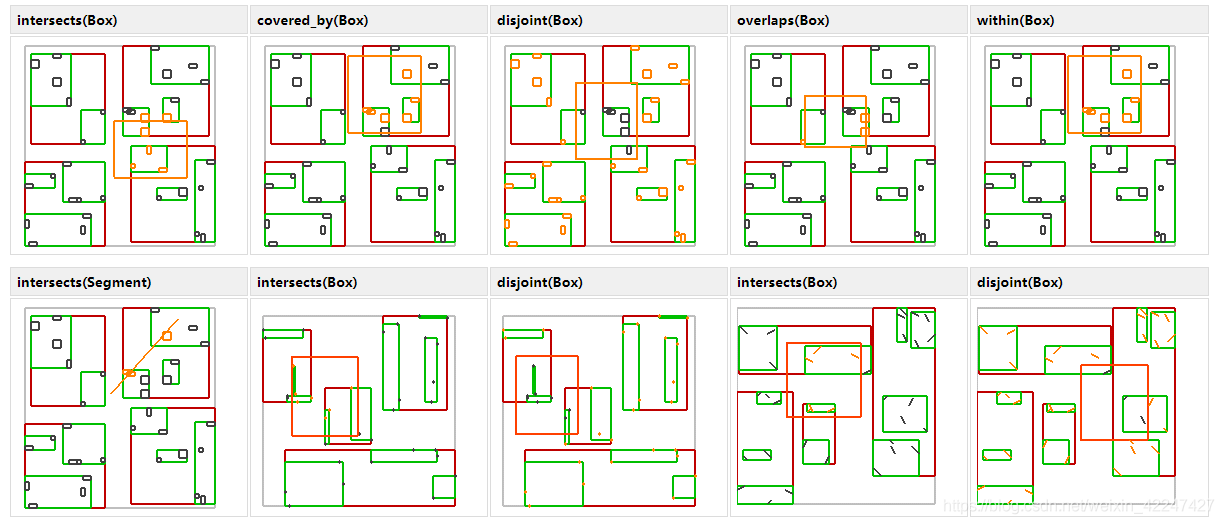
Boost 支持的几种空间查询规则如下:
实现
// Include necessary headers
#include <iostream>
#include <fstream>
#include <vector>
#include <string>
#include <cstdlib>
#include <ctime>

// Define the dimension of the data points
#define DIMENSION 2

// Define the maximum and minimum values for the data points
#define MAX_VALUE 1000
#define MIN_VALUE 0

// Define the number of data points to generate
#define NUM_POINTS 1000

// Define the maximum and minimum values for the range query
#define MAX_RANGE 100
#define MIN_RANGE 10

// Define the number of queries to generate
#define NUM_QUERIES 10

// Define the maximum and minimum values for the leaf and node capacity
#define MAX_CAPACITY 10
#define MIN_CAPACITY 5

// Define the structure for a data point
struct Point {
    int id;
    std::vector<int> coords;
};

// Define the structure for a range query
struct RangeQuery {
    std::vector<int> minCoords;
    std::vector<int> maxCoords;
};

// Define the structure for a node in the R-tree
struct Node {
    bool isLeaf;
    std::vector<Node*> children;
    std::vector<Point*> points;
};

// Function to generate a random integer between min and max (inclusive)
int randomInt(int min, int max) {
    return rand() % (max - min + 1) + min;
}

// Function to generate a random data point
Point* generatePoint(int id) {
    Point* p = new Point;
    p->id = id;
    for (int i = 0; i < DIMENSION; i++) {
        p->coords.push_back(randomInt(MIN_VALUE, MAX_VALUE));
    }
    return p;
}

// Function to generate random range query
RangeQuery* generateRangeQuery() {
    RangeQuery* q = new RangeQuery;
    for (int i = 0; i < DIMENSION; i++) {
        int minCoord = randomInt(MIN_VALUE, MAX_VALUE - MIN_RANGE);
        int maxCoord = randomInt(minCoord + MIN_RANGE, MAX_VALUE);
        q->minCoords.push_back(minCoord);
        q->maxCoords.push_back(maxCoord);
    }
    return q;
}

// Function to generate a random R-tree
Node* generateRtree(int capacity) {
    Node* root = new Node;
    root->isLeaf = true;
    for (int i = 0; i < capacity; i++) {
        Point* p = generatePoint(i);
        root->points.push_back(p);
    }
    return root;
}

int main() {
    // Seed the random number generator
    srand(time(NULL));

    // Generate data points
    std::vector<Point*> points;
    for (int i = 0; i < NUM_POINTS; i++) {
        Point* p = generatePoint(i);
        points.push_back(p);
    }

    // Generate range queries
    std::vector<RangeQuery*> queries;
    for (int i = 0; i < NUM_QUERIES; i++) {
        RangeQuery* q = generateRangeQuery();
        queries.push_back(q);
    }

    // Generate R-tree
    Node* root = generateRtree(randomInt(MIN_CAPACITY, MAX_CAPACITY));

    // Print out the data points, range queries, and R-tree
    // ...

    return 0;
}
2.4 计算几何
#计算几何
GC-01: 多边形面积计算
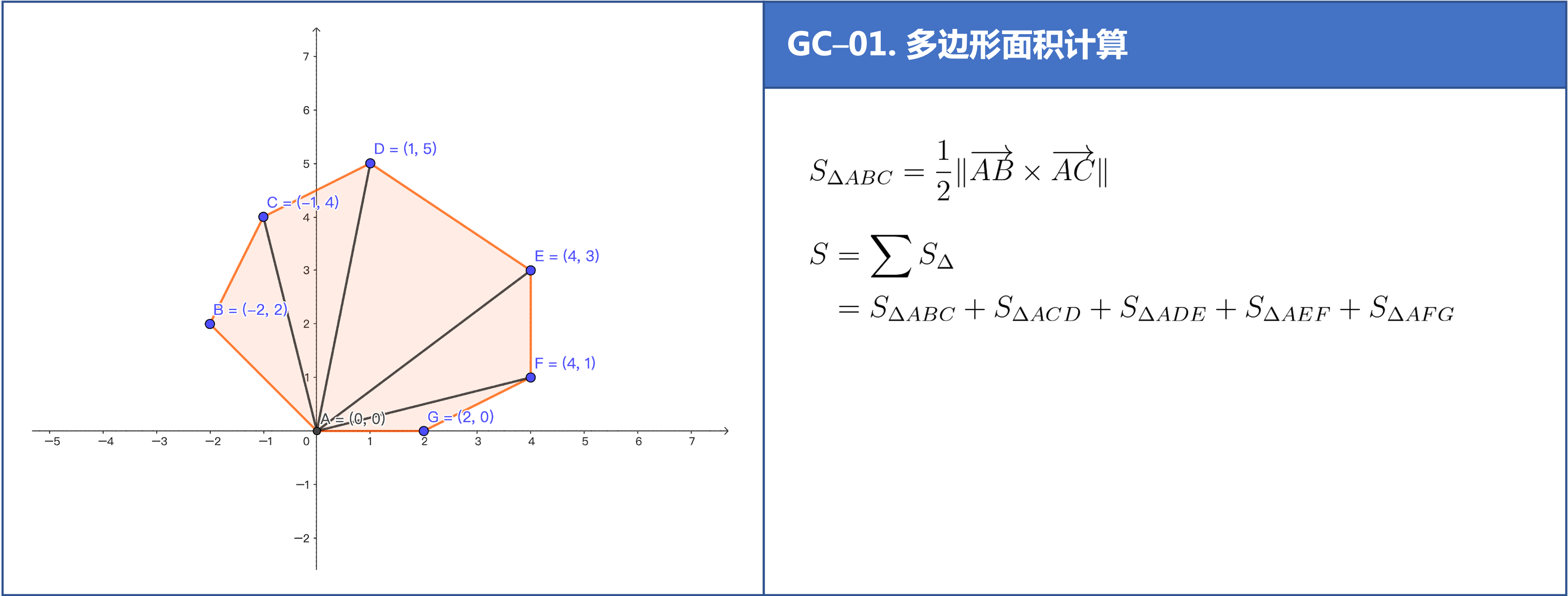
这里提供依据向量进行多边形面积计算的公式推导。首先考虑最简单的三角形的面积计算公式,令三角形的三个顶点为 \(P_1,P_2,P_3\) 则有:
注意这里用到了向量叉乘的反向结合律,即:\(P_2\times P_1=-P_1\times P_2\);同理可以验证四边形的面积计算公式也符合上面的规律,继而可以推证多边形的面积计算公式为:
//叉积,可以用来判断方向和求面积
double cross(Point a,Point b,Point c){
    return (c.x-a.x)*(b.y-a.y) - (b.x-a.x)*(c.y-a.y);
}

//求多边形的面积
double S(Point p[],int n){
    double ans = 0;
    p[n] = p[0];
    for(int i=1;i<n;i++){
       ans += fabs(cross(p[0],p[i],p[i+1]));
    }
    return ans / 2.0;
}
GC-02: 线段中垂线计算
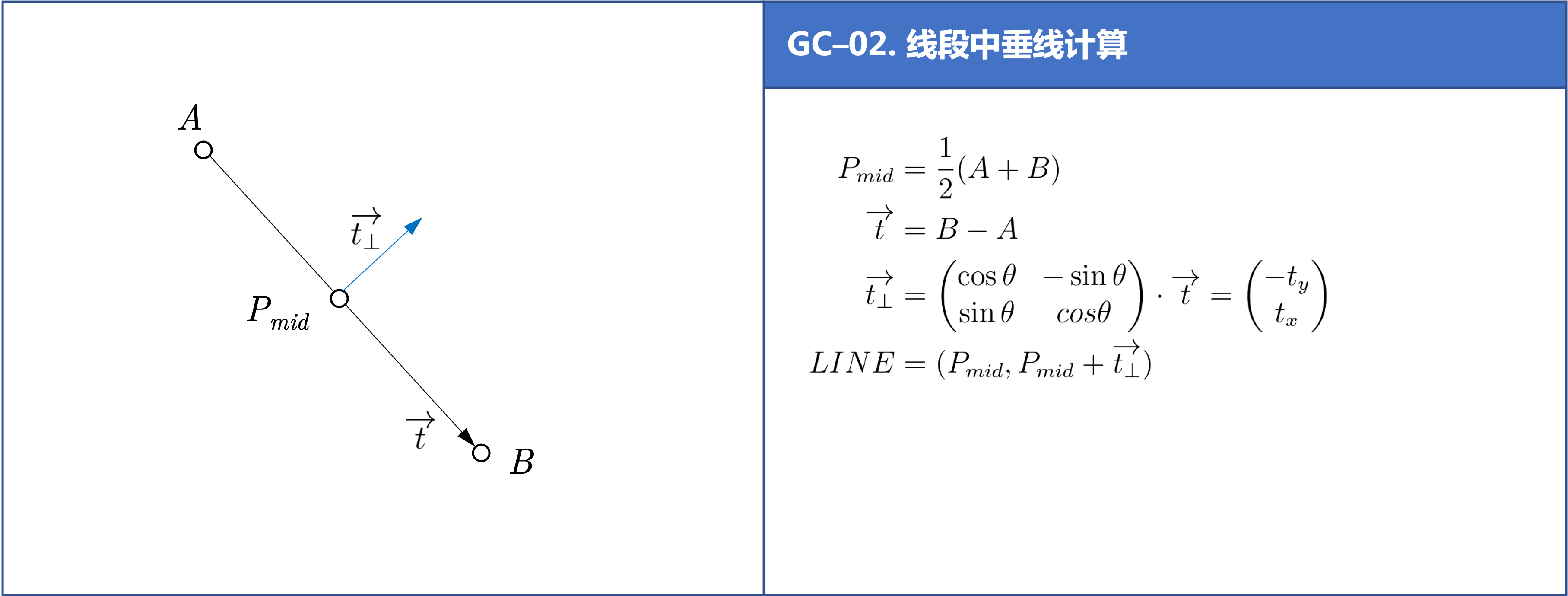
//求线段的中垂线
inline Line getMidLine(const Point &a, const Point &b) {
    Point mid = (a + b);
    mid.x/=2.0;
    mid.y/=2.0;
    Point tp = b-a;
    return Line(mid, mid+Point(-tp.y, tp.x));
}
GC-03: 点线间最短距离
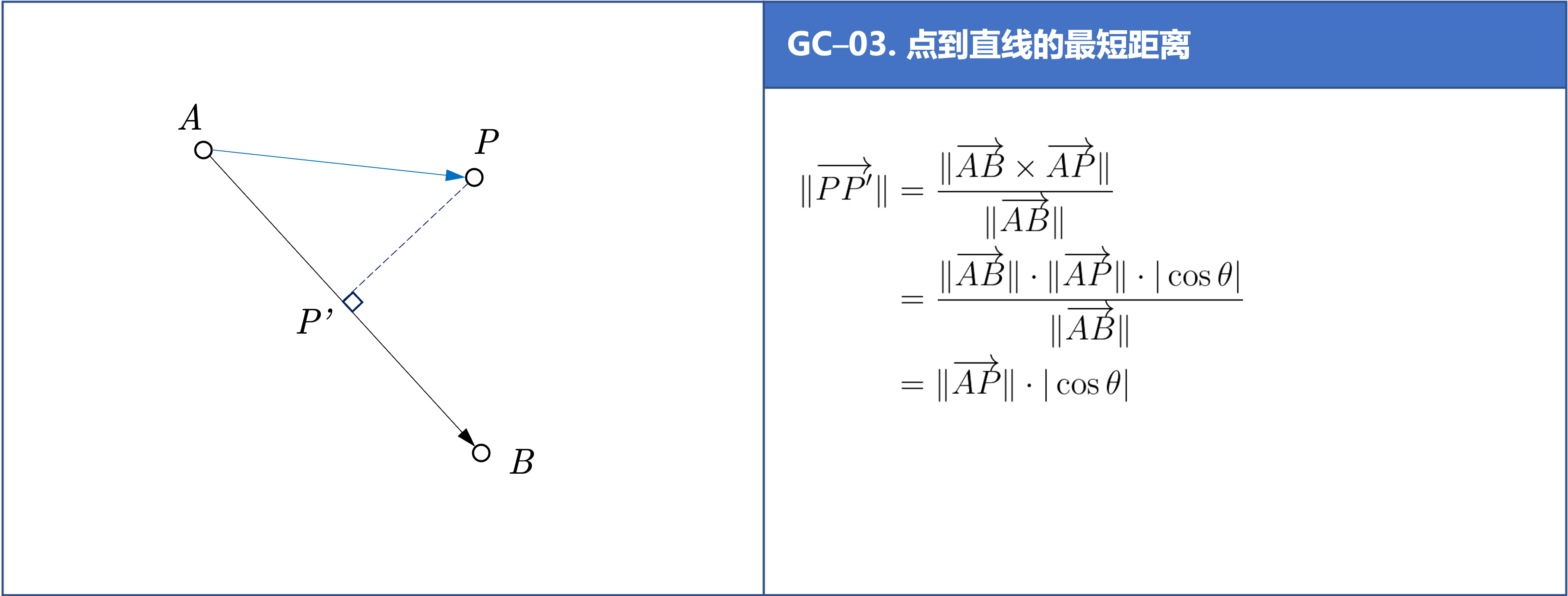
//求点到线的最短距离
double inline getMinDistance(Point &point, Line& geom){
    if(geom.size() != 2){ return -1.0; }
    Point& A = geom.front();
    Point& B = geom.back();
    Point AB = B - A;
    Point AP = point - A;
    return fabs(cross(AB, AP) / AB.modulus());
}
GC-04: 多边形顺序判断
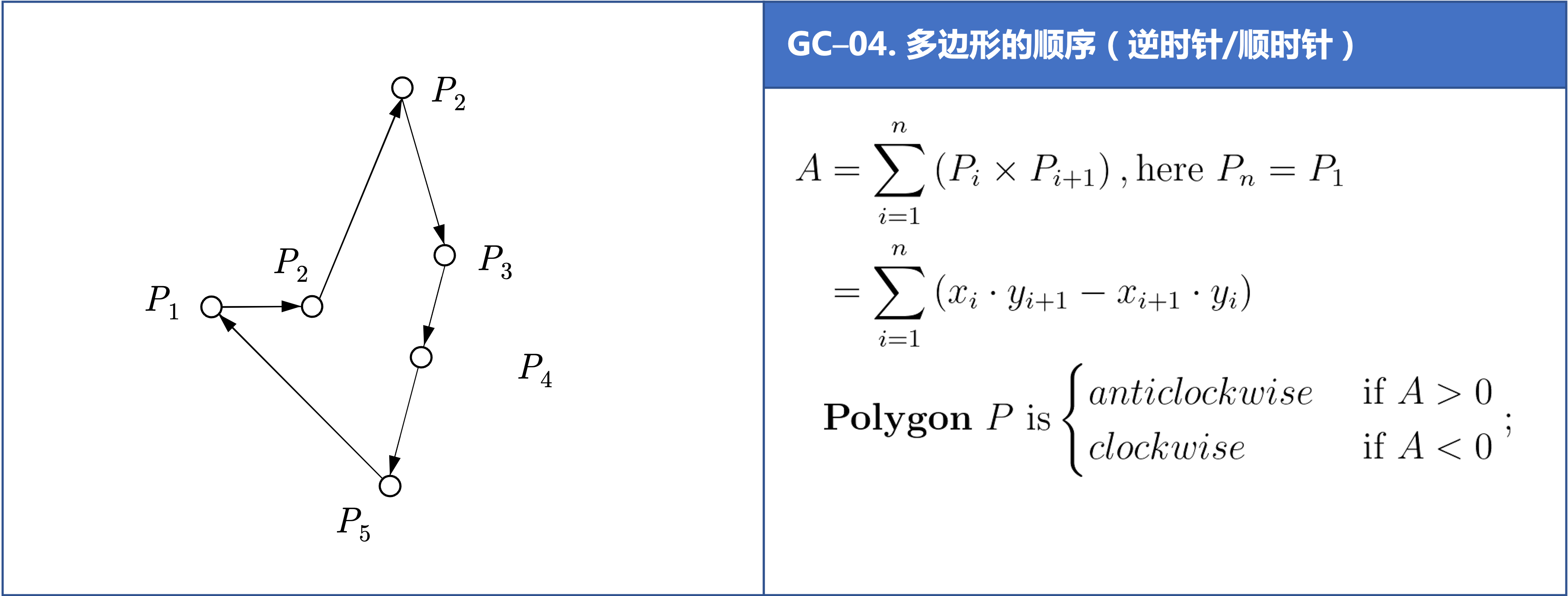
int check_polygon_clockwise(
    int cross_id,
    const CoordinateSequence &polygon,
    std::map<Line, std::list<Line>> &edge_map_of_polygon)
{
    // 边界条件
    Coordinate last_pt(0.0, 0.0);
    if(polygon.size() < 3) { return false; }
    if(!(polygon.front() == polygon.back())){
        last_pt = polygon.front();
    }

    // 符号判定
    auto is_same_sign = [](double& a, double& b){
        return (a < 0) && (b < 0);
    };

    // 计算多边形面积从而确定其顺序
    double last_si = std::numeric_limits<double>::quiet_NaN();
    int concave_cnt = 0;
    double s = 0.0;
    for(int i = 0; i < polygon.size(); ++i){
        double si = 0.0;
        if(i == polygon.size() - 1){
            if(!(last_pt == Coordinate(0.0, 0.0))){
                // 多边形最后一个点不是首点时
                Line line = Line(polygon.at(i), last_pt);
                si = cross(polygon.at(i), last_pt);
                if(edge_map_of_polygon.count(line) == 0){
                    edge_map_of_polygon.insert({line, {line}});
                }else{
                    edge_map_of_polygon.at(line).push_back(line);
                }
            }
        }else{
            Line line = Line(polygon.at(i), polygon.at(i + 1));
            si = cross(polygon.at(i), polygon.at(i + 1));
            if(edge_map_of_polygon.count(line) == 0){
                edge_map_of_polygon.insert({line, {line}});
            }else{
                edge_map_of_polygon.at(line).push_back(line);
            }
        }
        s += si;
        if(!std::isnan(last_si)){
            if(!is_same_sign(last_si, si)){
                concave_cnt++;
            }
        }
        last_si = si;
    }

    if(concave_cnt > 0){
         // 可能为凹多边形
    }

    return s < 0;
}
GC-05: 直线交点
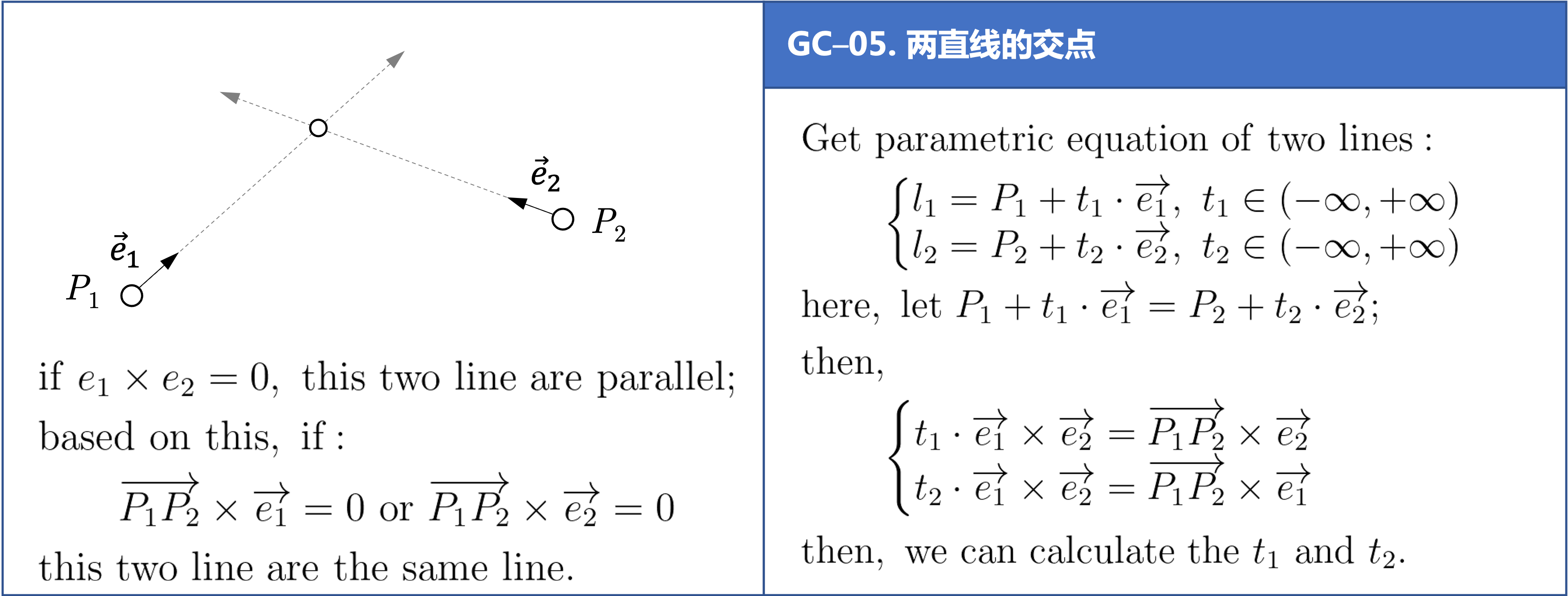
LineLineRelation line_line_math_intersection(
    const Coordinate& p1_a, const Coordinate& p1_b,
    const Coordinate& p2_a, const Coordinate& p2_b,
    Coordinate& result)
{
    Coordinate e1 = p1_b - p1_a;
    Coordinate e2 = p2_b - p2_a;
    e1 = e1.normalize();
    e2 = e2.normalize();
    const Coordinate& P1 = p1_a;
    const Coordinate& P2 = p2_a;
    Coordinate P1P2 = P2 - P1;
    double cross_e1_e2 = cross_direction(e1, e2);
    if(fabs(cross_e1_e2) < 0.0871){
        // 夹角小于 5° 或大于 175° 时认为是平行线
        return LineLineRelation::LINE_PARALLEL; // 两条线平行
    }
    double t1 = cross_direction(P1P2, e2)/ cross_e1_e2;
    double t2 = cross_direction(P1P2, e1)/ cross_e1_e2;

    // 如果计算结果不一致则说明计算异常
    Coordinate P = P1 + e1 * t1;
    Coordinate P_ = P2 + e2 * t2;
    if(!(P == P_)){
        return LineLineRelation::LINE_UNKOWN; // 计算异常
    }

    // 取均值以提高准确度
    print_point(P);
    print_point(P_);
    result = P + P_;
    result.x = result.x * 0.5;
    result.y = result.y * 0.5;
    return LineLineRelation::LINE_INTERSECTION;
}
2.5 道路术语
#道路导航简写
高速公路导航提示中IC、JC、SA等字样的含义解释:
IC : Inter Change 英文缩写,意为高速公路转换出入口,即高速公路至一般公路的出入匝道。从标有“IC”的地方,可以下高速公路。
JC : Joint Change/Circuit 的英文缩写,意为高速公路连接口或连接匝道。即不同高速公路之间的连接线路。从标有“JC”可以直接转到另一条高速公路上。
SA : Service Area 的英文缩写,意为服务区。特指高速公路服务区。
PA : Parking Area 的英文缩写,意为停车区域。特指高速公路停车区。
TG : Toll Gate 的英文缩写,意为收费站。遇到这个标志,您要掏腰包了。
IN : 路径入口。一般是指环岛的入口,或从辅路进到主路的地方。
OUT : 路径出口。一般是指环岛的出口,或从主路转到辅路的的地方。
2.6 准召率和召回率
#准召率
不妨举这样一个例子:某池塘有1400条鲤鱼,300只虾,300只鳖。现在以捕鲤鱼为目的。撒一大网,逮着了700条鲤鱼,200只虾,100只鳖。那么,这些指标分别如下:
正确率 = 700 / (700 + 200 + 100) = 70%
召回率 = 700 / 1400 = 50%
F1 值 = 70% * 50% * 2 / (70% + 50%) = 58.3%
不妨看看如果把池子里的所有的鲤鱼、虾和鳖都一网打尽,这些指标又有何变化:
正确率 = 1400 / (1400 + 300 + 300) = 70%
召回率 = 1400 / 1400 = 100%
F1 值 = 70% * 100% * 2 / (70% + 100%) = 82.35%
参考文献
lovebay. 计算几何常用的函数/方法[EB/OL]. #计算几何
开心经验. 纬度距离计算公式[EB/OL].
知乎. PostgreSQL 中的 R 树和 RD 树介绍[EB/OL].
CSDN 博客. 什么是R树[EB/OL].
CSDN 博客. 【树】从二叉树到空间索引树[EB/OL].
CSDN 博客. # 高速公路导航提示中IC、JC、SA等字样的含义[EB/OL].
HBLOG. # 准确率(Precision)、召回率(Recall)、F值(F-Measure)[EB/OL].
知乎. # 如何使用 boost::geometry::index::rtree[EB/OL].
CSDN 博客. # Boost.Geometry的RTree空间索引[EB/OL].
Adam Wulkiewicz. Boost.Geometry R-tree speeding up geographical computation[EB/OL].
CSDN 博客. R 树算法 C++ 实现[EB/OL].
Wolfram Mathword. 多边形面积计算公式[EB/OL].
CSDN 博客. # 直线射线线段的相交判断[EB/OL].
博客园. # 机器学习算法中的准确率(Precision)、召回率(Recall)、F值(F-Measure)[EB/OL].
3. 系统及软件
3.1 Mac 常用软件梳理
#mac软件
Yoink:文件置物架,用于便捷的文件拷贝;
DataGraph:数据可视化工具;
Mos:优化 MAC 鼠标操作;
TinyCal:日历状态栏工具;
MacDroid:MAC 和手机传输文件工具;
Obsidian:笔记本管理工具;
Snipaste:截图工具;
3.2 gdb 使用 core 文件
#core
什么是 core 文件
当程序运行过程中出现 Segmentation fault (core dumped)
错误时,程序停止运行,并产生 core 文件。core
文件是程序运行状态的内存映象。使用 gdb 调试 core
文件,可以帮助我们快速定位程序出现段错误的位置。当程序访问的内存超出了系统给定的内存空间,就会产生
Segmentation fault (core dumped),因此,段错误产生的情况主要有:
core dumped 又叫核心转储,当程序运行过程中发生异常导致程序异常退出时,由操作系统把程序当前的内存状况存储在一个 core 文件中,也即 core dumped。
调试 core 文件
gdb <program> core    # 用 gdb 同时调试一个运行程序和 core 文件

(gdb) l(list)        # 显示源代码,并且可以看到对应的行号;
(gdb) b(break)x      # x是行号,表示在对应的行号位置设置断点;
(gdb) p(print)x      # x是变量名,表示打印变量x的值;
(gdb) r(run)         # 表示继续执行到断点的位置;
(gdb) n(next)        # 表示执行下一步;
(gdb) c(continue)    # 表示继续执行;
(gdb) q(quit)        # 表示退出gdb;
(gdb) info share      # 查看已加载的动态库;
(gdb) bt              # 查看程序堆栈信息;
参考文献
CSDN 博客. # linux下使用gdb调试core文件[EB/OL].